EA-Logo-RGB-Master_Yellow-Dark-Grey-Black


Currency

Cart 0

SIGN UP FOR $10 OFF YOUR FIRST ORDER

Sorry, looks like we don't have enough of this product.

Pair with
Estimate shipping
Add order notes
Is this a gift?
Subtotal Free
View cart
Shipping, taxes, and discount codes are calculated at checkout

Your Cart is Empty

Home / Lighting / Driving & light bars

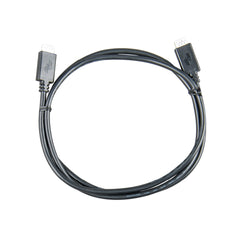
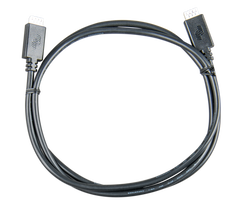
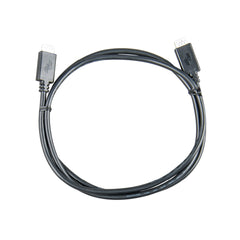
Victron VE.Direct data cable, 1.8m, straight connectors both ends

Victron Energy

Victron VE Direct Cable 1.8m

ASS030530218

Genuine Victron VE.Direct data cable 1.8m, straight both ends — TTL serial protocol, 4-pin JST-XH connectors, links any two VE.Direct-enabled devices for VictronConnect and VRM cloud monitoring.

Length: 1.8m
Connector: Straight both ends

$22.95

4 interest-free payments of $5.74 with
or finance your build with
We accept
Universal auxiliary fitmentWorks with any Victron VE.Direct enabled device — not specific to any vehicle, vessel, or system.

Shipping & collection

Worldwide shipping available*
In-store pickup
Professional installation available

*Shipping is calculated at checkout based on your location. Some products can't be delivered to every address.

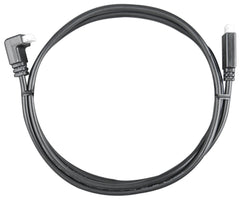
The Victron VE.Direct Cable 1.8m (straight-both-ends version) is a genuine Victron Energy accessory that links two VE.Direct-enabled devices for data communication. Straight connectors at each end. Elevate also stocks a right-angle 1.8m version for tight enclosures — both variants appear in the size table below.

⚠ Do not: cut, splice, or join two VE.Direct cables together — it breaks the pinout and stops communication. If your devices are more than 10 metres apart, use a VE.Direct to USB interface with an active USB extension instead.

What VE.Direct is doing under the hood

VE.Direct is Victron's proprietary serial protocol — a simple bidirectional TTL data link running at 19,200 baud over four conductors. One Victron device talks to another, or a Victron device reports up to a GX product (Cerbo GX, Ekrano GX, GlobalLink 520) which then pushes data to the VRM cloud portal for remote monitoring. It's how a SmartSolar MPPT tells a SmartShunt how much solar is being harvested, and how any Victron device shows up on a phone or laptop through the VictronConnect and VRM apps.

The pinout is Victron-controlled and not published for third-party manufacture. A generic serial cable won't work, USB won't work, and no non-Victron VE.Direct cable is available. This is why the cable itself is a stocked item rather than something you build from bulk.

Common device pairings

Any two Victron devices with a VE.Direct port can pair, or one device can feed a GX product for cloud monitoring. The most common setups this cable ends up in:

  • SmartSolar MPPT → SmartShunt / BMV battery monitor — MPPT reports charge current so the shunt's state-of-charge stays accurate on one screen.
  • SmartSolar MPPT → Cerbo GX / Ekrano GX — sends solar production to the GX display and up to VRM.
  • BMV-712 / SmartShunt → Cerbo GX — battery voltage, current, SOC and time-to-go into the whole-system dashboard.
  • Orion Smart DC-DC → Cerbo GX — dual-battery charger reports charge stages and current back to the monitor.
  • Any VE.Direct device → GlobalLink 520 — turns a single VE.Direct device into a 4G cloud-connected one without needing a full GX.

Which length do you need?

VE.Direct communication is supported over cable runs up to 10 metres total — pick the length (and connector) that matches how your devices are mounted. The yellow-highlighted row is what you're looking at now.

Length Connector Typical use
0.3m Straight both ends Ports mounted directly beside each other in the same port stack
0.9m Straight both ends Two devices in the same enclosure, e.g. MPPT and GX side-by-side
1.8m Straight both ends General reach across a small enclosure or panel
1.8m One end right-angle Feeding into a tight enclosure or behind a panel where a straight plug won't clear
3m Straight both ends Devices in the same compartment but not side by side
5m Straight both ends Longer runs across a canopy, caravan, or boat cabin
10m Straight both ends The longest run VE.Direct supports — devices at opposite ends of a large setup

Other lengths we stock

Every other VE.Direct cable length and connector in the range:
  • Genuine Victron — factory-terminated with the correct pinout
  • 5V TTL serial — 19,200 baud data over 4 conductors
  • Bidirectional — device-to-device or device-to-GX
  • JST-XH 4-pin — Victron's proprietary VE.Direct standard
  • Fixed length — never cut, splice or substitute
  • Plug and play — no config needed, pairing is automatic

Protocol

Type: TIA-232 TTL serial

Signal: 5V TTL

Baud rate: 19,200 bps

Direction: Bidirectional

Physical

Connector: JST-XH 4-pin

Conductors: 4-wire

Pinout: TX / RX / GND / +5V

Max run length: 10 metres

Compatibility

Manufacturer: Victron Energy

Part range: ASS0305xxxxxx

Third-party: Not supported

Works with any Victron VE.Direct enabled device — not specific to any vehicle, vessel, or system.

Q: What does VE.Direct actually mean?
VE.Direct is Victron's proprietary serial protocol — a bidirectional 5V TTL data link running at 19,200 baud over 4 conductors, using a JST-XH 4-pin connector at each end. It's how one Victron device talks to another (SmartSolar MPPT to SmartShunt, for example) or how a Victron device reports up to a GX product for on-screen display and VRM cloud monitoring.

Q: Which Victron devices use VE.Direct?
SmartSolar and BlueSolar MPPT charge controllers, BMV-712 battery monitor, SmartShunt battery monitor, Orion Smart DC-DC chargers, Phoenix Inverters (VE.Direct model), Cerbo GX / Ekrano GX / Venus GX (all GX products), and GlobalLink 520 4G reporter. Any Victron device with a labelled VE.Direct port takes this cable.

Q: How does VE.Direct differ from VE.Bus and VE.Can?
Victron uses three separate data buses. VE.Direct is a lightweight point-to-point serial link between one small device (MPPT, monitor) and one other device or GX — 4-pin JST-XH connector, one hop only, no daisy-chain. VE.Bus is Victron's high-power inverter/charger bus used by MultiPlus and Quattro (RJ45 cable, higher voltage). VE.Can is Victron's CANbus for larger BMS and multi-device coordination (RJ45 cable, terminated bus). The three aren't interchangeable — they use different cables, different protocols and different device ports.

Q: Can I use a generic serial or USB cable instead?
No. VE.Direct uses a JST-XH connector with a specific 4-pin pinout Victron controls — TX, RX, GND and +5V — and it isn't published for third-party manufacture. A standard TTL serial cable has the wrong connector; a USB cable has the wrong protocol. If you need USB (for a laptop or logger), use Victron's own VE.Direct to USB interface (ASS030530000) instead of this cable.

Q: Can I cut, extend, or join two cables together?
No. VE.Direct is a fixed-length data cable, not bulk wire — cutting or splicing it breaks the pinout and stops communication. The protocol is only supported over runs up to 10 metres total; for longer distances use a VE.Direct to USB interface with an active USB extension instead of joining cables end to end.

Q: Do I need the straight or right-angle version?
Every length ships with a straight connector on both ends, except 1.8m — that length is stocked as two separate cables: a straight-both-ends version and a right-angle version (one end right-angle) for feeding into tight enclosures or behind an instrument panel where a straight plug won't clear. Both 1.8m listings appear in the size table on this page.

Q: Do I need to configure anything when I plug it in?
No. VE.Direct is plug and play — the receiving device auto-detects the connected device and starts exchanging data as soon as both are powered. Firmware updates are the only setup step, and those are handled by VictronConnect on your phone once the devices are talking. No baud rate, port or address setting is needed.

Q: Does this cable carry power?
The VE.Direct connector carries a +5V line alongside the data pins, so a small VE.Direct device with a very low draw (like a GlobalLink 520) can be powered by the connected Victron device. Larger devices (MPPTs, monitors, chargers) have their own power feed and don't rely on the cable for it. This cable is not intended for battery charging or main-power distribution — it's a data cable that happens to carry a 5V logic supply.

Q: Can I daisy-chain multiple devices on one cable?
No. VE.Direct is a point-to-point link — one cable, two devices, one end each. To connect three or more VE.Direct devices to a single Cerbo GX or Ekrano GX, use a separate VE.Direct cable per device into the GX's own VE.Direct ports (most Cerbo models have three or more). For very large systems where the GX's VE.Direct ports are full, the VE.Direct-to-USB interface lets you add more via the GX's USB hub.

Q: Do these cables ever fail?
As a passive data cable with two solid moulded connectors and no active electronics, failures are rare and almost always mechanical — a connector pulled loose from repeated plug/unplug cycles, or a pinch damaging the sheath. If a Victron device that was reporting fine suddenly stops appearing in VictronConnect or VRM, the cable is the first thing to swap. Under Victron's 5-year warranty a genuinely defective cable is replaced.

Join our community.